A walking pad almost never fails because the motor dies. It fails because the setup was wrong on day one. The desk is two inches too low, the belt sits on thick carpet, the remote needs a clean line of sight and lives in a drawer, and by week three the pad is a slab under the bed. I have watched that cycle happen in my own home office twice, with two different pads, before I admitted the problem was never the pad.
I am Nina. I spent nine years as a backend engineer sitting ten hours a day, then herniated my L5 disc at 31. My physical therapist gave me one instruction that stuck: move every hour or pay for it later. That turned a home office rebuild into a project, and the project into a spreadsheet of decibel readings, belt widths, and step counts. An under desk walking pad is the cheapest way I know to buy back movement during a workday, but only when the setup respects a few physical facts.
What follows is the order I actually do it in, plus the two pads I would build that setup around.
Why you should trust me
I review walking pads and standing desk gear from a home office in Austin, Texas, that I rebuilt around movement after the disc injury. I keep three pads in rotation, a step counter, a tape measure, and a spreadsheet of decibel readings taken at my desk, at ear height, while walking. That last detail matters, because it is the opposite of how the numbers on a product page get taken.
My working rule is blunt: if a pad cannot hold 2 mph at a reasonable noise level, it is a very expensive footrest. I do not run on walking pads, because running is a treadmill review with a different safety profile, and I do not make medical claims about backs. What I do is set pads up, live with them for months, and report what breaks first. Usually it is the remote.
How I picked and how I tested
The specs I care about are the boring ones. Belt width, because a narrow belt punishes a wandering stride and makes you stare down at your feet. Deck height, because every extra inch changes where your desk has to sit. Sustained horsepower versus peak, because peak is a marketing word and sustained is what you actually walk on. Warranty length, because a company that trusts its motor backs it for years, not months.
I also log the remote, which almost nobody tests and I use about 40 times a day. I want to know whether it needs line of sight to the sensor, whether the buttons register on the first press, and whether the battery door can be opened by a human with fingernails. That sounds petty until your remote dies while the belt is moving at 2 mph and you have to find the app.
Here is the honest limit of any buying guide, including mine. A spec sheet tells you what a pad claims. It does not tell you whether the frame wobbles at 2.5 mph after six months, and the only way to know that is to own it. So I treat the feature list as a filter, not a verdict, and I weight the things that cannot be faked: deck height, belt width, warranty, and how the controls behave.
What you need before you start
You cannot set up a walking pad under a desk that does not adjust. This is the part people skip, and it is why the pad ends up in a closet. A pad under a fixed-height desk turns into a footrest or a tripping hazard. If your desk does not move, fix that first, because the pad depends on it.
The rest of the list is short. A firm, thin surface under the pad if you are on carpet. A monitor that can be raised independently, because your screen height has to follow your walking posture, not your standing posture. Shoes or no shoes, decided in advance, since barefoot walking changes how much shock absorption you want under the belt. And a place the pad lives when it is not in use, decided before it arrives, so the decision is not made in a bad mood on a Tuesday.
One caveat worth saying out loud: a walking pad is not a treadmill, and comparing the two is how people get hurt. Walking pads are built for slow, sustained, low-impact movement at a desk. They are not built for intervals, they are not built for running, and they are not built for a 200 pound person at 4 mph.
The two pads worth building the setup around
Two pads, two different jobs. One is for the person who wants movement without thinking about it. The other is for the person who wants a handle bar and a fold, and is willing to pay for both.
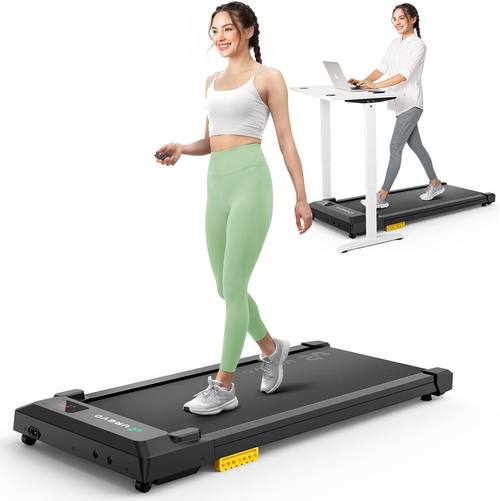
Budget pick: UREVO Smart Walking Pad, Standing Desk Treadmill with Double Shock Absorption, Quiet Operation, Workout APP with Track Insights and MIIT Mode, Plug and Play, Remote or APP Control for Home Office
 Visit on Amazon →
This is the feature list I would hand to someone building their first desk setup. Double shock absorption matters more than it sounds, because if you plan to walk barefoot or in socks, the deck under the belt is doing the work your shoes would normally do. Quiet operation is a claim, not a measurement, so treat it as a starting point and test it yourself while walking, not at idle.
The controls are the part I would read twice. Remote or app control is the right order: the remote should be the primary and the app should be the backup, not the other way around. If the app wants an account before it lets you change speed, the remote becomes your whole interface, which is fine, as long as it reaches the sensor from where you sit. Plug and play matters more than people admit, because anything that needs assembly gets assembled once and resented forever.
Workout app tracking with insights and a MIIT mode is a nice-to-have for me and a real motivator for some people. What I would check first, before anything else: deck height against your desk's lowest comfortable setting, belt width against your natural stride, and whether the controls work from your chair. Check current Amazon price.
Flaws but not dealbreakers: Any pad in this tier will ask you to accept a narrower belt and a lighter frame than the expensive models. If you are tall, measure your stride before you commit, because a short belt makes you shorten your step, and a shortened step is a worse walk.
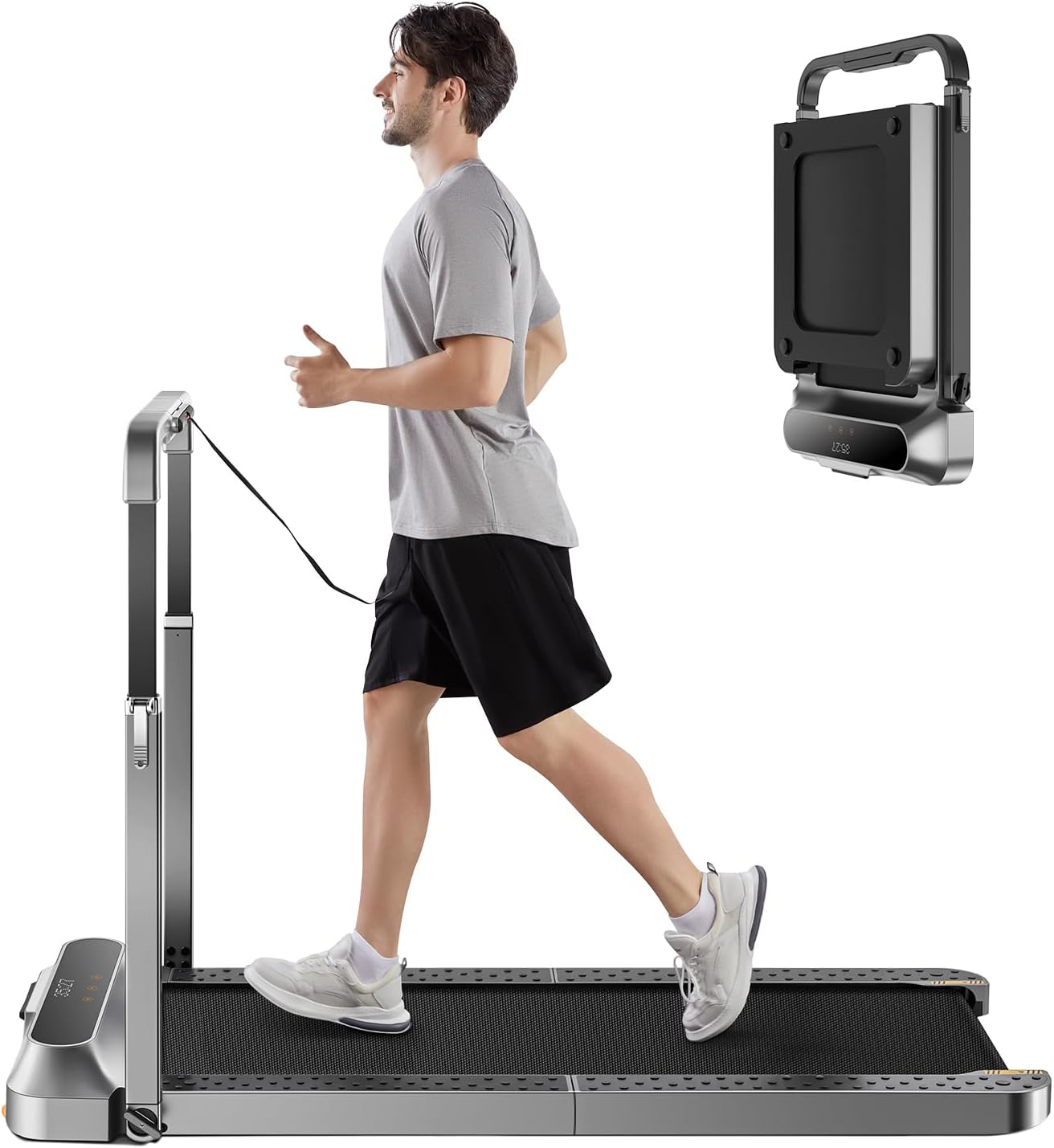
Upgrade pick: WALKINGPAD Folding Treadmill, 2 in 1 Walking Pad with Handle Bar
 Visit on Amazon →
The handle bar changes the setup math in ways worth understanding before you buy. A bar gives you something to steady against during the first week, when walking on a moving belt still feels like a small betrayal by your inner ear. It also gives you a place to hang a towel, which sounds trivial and is not.
The trade is floor space and clearance. A pad with a bar needs more room when it is deployed, and folding it does not make it weightless. The two questions I would answer before ordering: where does it stand when open, and does the bar clear your desk edge at your walking height? If the bar collides with the desktop, you will end up walking with your arms pinned, which is worse than no bar at all.
The 2 in 1 framing is the other thing to think through. If the bar folds down, you get a low-profile walking pad for meetings and a steadier walk for the parts of the day when nobody is watching your camera. That flexibility is the reason to pay more here, not the motor. Check current Amazon price.
Flaws but not dealbreakers: A folding mechanism is one more thing that can loosen over years of daily folding. If you plan to fold it twice a day, buy it expecting to tighten hardware occasionally.
How to set up a walking pad at a standing desk, step by step
Step one: Clear the floor and pick the surface. Hard floor or a thin, firm mat. Thick pile carpet changes deck height, traps heat under the motor, and makes the whole setup feel spongy, which is exactly the feeling you do not want under your feet at 2 mph. If you must be on carpet, use a thin dense mat and recheck your desk height afterward. Then check the wheels. A pad whose wheels scrape hardwood will mark the floor and will slowly walk itself out of position over a week.
Step two: Put the pad where you actually stand. Not where the desk is centered. Most people stand a few inches off center, usually toward their dominant side. Center the belt under your feet and let the desk be slightly off, not the other way around.
Step three: Step on before you raise the desk. Set the pad to its lowest speed, or off, and get on. Keep one hand on the desk edge. Never step onto a belt that is already moving at speed, and never step off at speed. Slow to a stop first, every time, even when you are in a hurry.
Step four: Raise the desk to walking height, then fix the monitor. Elbows near 90 degrees, wrists flat on the keyboard, and set it while you are mid-stride, not standing still. Walking posture is not standing posture. Your shoulders drop, your weight shifts, and the desk height that felt right when you were motionless will feel an inch off after ten minutes. Set it, walk ten minutes, adjust once, and then leave it alone.
Step five: Learn the remote and park it where your hand already goes. I press mine around 40 times a day, and the difference between a good setup and a bad one is whether that press works from a seated position without aiming. If the remote needs a clean line to the sensor, find the angle and tape a mark so you stop hunting. If the app requires an account to change speed, treat the remote as your only interface and keep spare batteries in the desk drawer.
Step six: Start slower than feels useful, then add cadence. Half a mile per hour to one mile per hour for the first week, in 20 minute blocks. The goal is hourly movement, not distance. Once the walk feels automatic, build to 2 mph and stay there. Somewhere past that, wobble shows up, and wobble is where pads get returned.
Step seven: Test the noise while walking, at ear height, during a real call. Idle decibel ratings are marketing. Join a test call, walk at your working speed, and record yourself. If you have to mute in order to walk, the pad is not quiet enough for meetings, which means you will use it less, which means the whole thing was a waste. The fix is usually scheduling: walk during email blocks and silent calls, and sit for the ones where you speak.
Step eight: Set your safety habits on day one. Confirm auto-stop works, and know how it triggers before you need it. Use the safety clip if the pad has one. No running. No turning around. No reaching behind the desk for a cable while the belt moves. No carrying hot coffee. These are boring rules that exist because the belt does not care how experienced you are.
Step nine: Schedule it or lose it. Put walking blocks in the calendar next to your meetings, not in a mental note. Twenty to thirty minutes an hour is plenty for the movement goal. Keep a step counter visible so the feedback is immediate. The pad that survives past week three is the pad whose schedule is boring and repeatable.
Step ten: Maintain it once a month. Vacuum under the deck, check belt tracking, lubricate per the manual, check the wheels and the hardware, and change the remote battery before it dies mid-walk. In my experience, the remote goes first, and that is a better quality tell than any spec sheet.
The competition and why it lost
Under-desk bikes are the closest competitor, and they lose on one point: pedaling while typing is a coordination tax. People do it for two weeks and stop. Walking is a motion you already know how to do, which is why walking pads survive longer in real offices.
Full treadmills lose on the job description. A treadmill is for running, and running is not what this guide is about. It is louder, it takes more floor, and it is the wrong tool under a desk.
Standing mats are not competition, they are a companion. A mat helps with standing fatigue, and it adds zero steps. Standing still all day is not the same as moving all day, and NEAT, the energy you burn just moving around, responds to steps, not to cushioning.
And a standing desk alone loses on honesty. Raising the desk changes your posture, which is worth something, but it does not add movement. The pad is the part that adds movement. That is why I review the pair, or not at all.
What this all costs
Both pads sit in different price tiers, and I am not going to quote you a number that changes next week. Check current Amazon price on each and do the division yourself: a pad used 200 days a year for two years is a cost per day that usually lands under a coffee. A pad that gets used eleven times and lives under the bed is the most expensive furniture in the house.
The bigger line item is usually the desk, because the pad is useless without one that adjusts. After that it is a mat, a monitor arm if your screen cannot go high enough, and possibly a pair of shoes you keep under the desk for walking only. None of that is exciting, and all of it is what makes the setup work past the novelty phase.
The setup is the whole product. Do it once, in the right order, and a walking pad stops being a gadget you are testing and becomes part of the workday you do not think about. That is the only version of this purchase that pays for itself.